Short answer: pick Divi if you build several sites or want to pay once and never renew. Pick Elementor if you want to start free, need one site, or want your content to survive if you ever stop using the builder. In my test, both built the same page with near-identical speed scores, so price and lock-in matter more than performance.
I built the same landing page in both builders on my test site in November 2026, using Divi 5.9.0 and Elementor 4.4.0 with Elementor Pro 4.4.0, on WordPress 7.1.4. Then I measured the pages, checked current prices on both official sites, and switched each builder off to see what happens to the content.
| Divi 5 | Elementor 4 | |
|---|---|---|
| What it is | A theme with a built-in visual builder | A plugin that works with most themes |
| Free version | No (30-day money-back guarantee) | Yes, on WordPress.org |
| Cheapest paid plan | $89 a year, unlimited sites | $60 a year, 1 site |
| Pay once option | Yes, $249 Lifetime | No |
| Lighthouse mobile score (my test page) | 87 | 85 |
| If you switch the builder off | Page content disappears | Text and links stay, without the design |
| Best for | Freelancers and agencies, people who hate renewals | Beginners, single sites, people who want to keep options open |
How I Tested Divi and Elementor
I built one demo page, for a made-up dog groomer called Bright Paws, in each builder. Each page has a hero section with a heading, text and button, three feature boxes with icons, and a closing call-to-action section with a dark background. I used each builder’s normal setup: Divi with the Divi theme, and Elementor with Elementor’s own free Hello Elementor theme.
Both pages ran on the same local test site with the same plugins active, so the comparison is fair, but the absolute numbers are not what you’d see on real hosting. I’ll point out what each result can and can’t tell you as we go.
Divi vs Elementor Pricing
This is where the two differ most. Divi charges per account, so every plan covers unlimited websites. Elementor charges per site, and the price goes up with the number of sites. I took these prices from each company’s pricing page on 10 November 2026.
| Plan | Price | Sites |
|---|---|---|
| Divi (yearly) | $89 a year | Unlimited |
| Divi Lifetime | $249 once | Unlimited |
| Divi Pro (adds Divi AI, Divi Cloud, VIP support and 4 team seats) | $277 a year | Unlimited |
| Elementor (free plugin) | $0 | Any |
| Elementor Essential | $60 a year | 1 |
| Elementor Advanced Solo | $84 a year | 1 |
| Elementor Advanced | $108 a year | 3 |
| Elementor Expert | $204 a year | 25 |
| Elementor One (adds AI credits, image optimization and other services) | $180 the first year, then $228 | 1 |
| Elementor One Agency | $432 the first year, then $540 | Unlimited |
Here’s what that means over five years, assuming today’s prices don’t change:
| Your situation | Divi | Elementor |
|---|---|---|
| One site, 5 years | $249 (Lifetime) or $445 (yearly) | $300 (Essential) or $420 (Advanced Solo) |
| 10 client sites, 5 years | $249 (Lifetime) or $445 (yearly) | $1,020 (Expert, up to 25 sites) |
| One site, 1 year only | $89 | $0 (free plugin) or $60 |
If you only need one simple site for a year, Elementor is cheaper, and its free version may be all you need. Once you run more than a couple of sites, or plan to keep using the builder for years, Divi costs much less. Even on a single site, Divi Lifetime ($249) costs less than five years of Elementor Essential ($300).
Both companies offer a 30-day money-back guarantee. For Elementor, it applies to annual plans only.
Building the Same Page in Both
Both builders let you edit the page visually, but they’re organized differently.
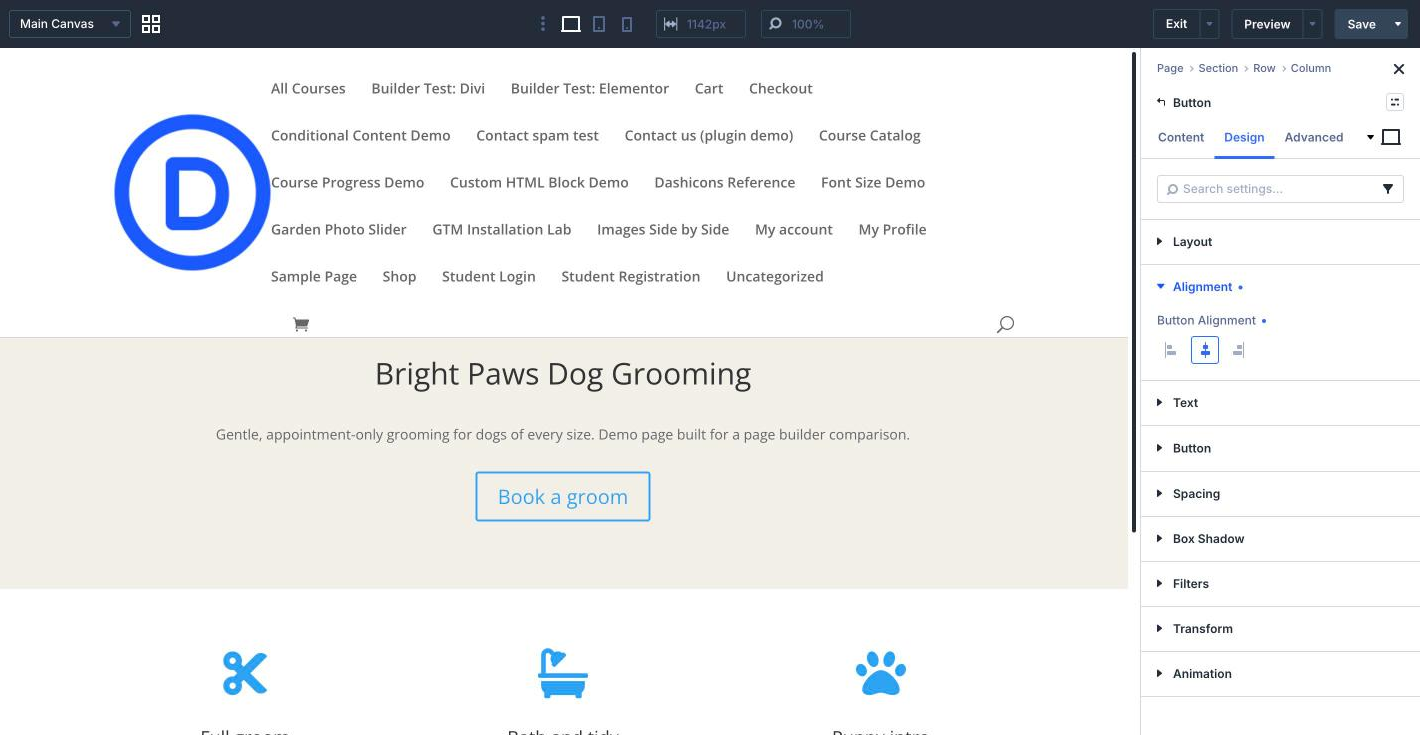
Divi 5 puts the page in the middle and the settings in a panel on the right. Every element has three tabs: Content, Design and Advanced. You can drop a module straight into a section, and Divi adds the row and column for you. To copy my first feature box into the other two columns, I right-clicked it, chose Copy > Copy Module, then right-clicked each empty column and chose Paste Module > Paste Module Inside.
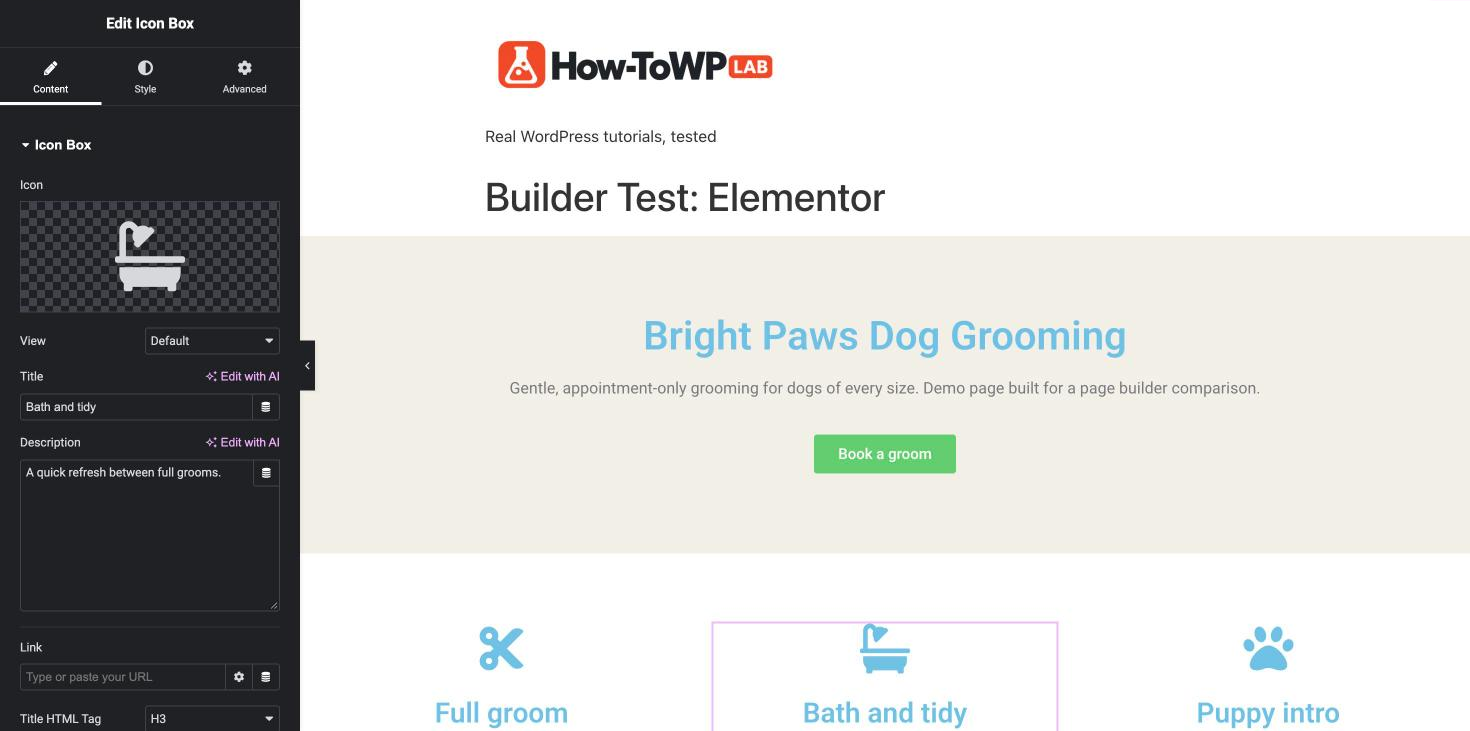
Elementor puts the settings panel on the left, with Content, Style and Advanced tabs. Layouts use containers that you nest inside each other. Elementor 4 also adds a new set of “Atomic” elements alongside the classic widgets, which can be confusing at first because some features exist in both forms.
A few things I noticed while building:
- Defaults: Divi’s Blurb module starts with a placeholder image at a large size, so I had to switch it to an icon and shrink it to 50px. Elementor’s Icon Box starts with a sensible icon size.
- Styling: Divi groups every style option for an element in one long Design tab. Elementor spreads them across Style and Advanced. Neither is harder, just different.
- Upsells: Elementor opened with a pop-up promoting its AI add-on before I could edit. Divi showed a “Generate Content With AI” button in each module, but no pop-up.
Speed: Divi vs Elementor
I ran Google Lighthouse 12.2.1 three times on each page in mobile mode and took the middle result. Lower times and fewer kilobytes are better.
| Metric | Divi 5.9 | Elementor 4.4 |
|---|---|---|
| Performance score | 87 | 85 |
| First Contentful Paint | 2.6 s | 2.3 s |
| Largest Contentful Paint | 3.5 s | 3.9 s |
| Total Blocking Time | 0 ms | 0 ms |
| Cumulative Layout Shift | 0 | 0 |
| Page weight | 399 KB | 474 KB |
| Requests | 45 | 58 |
| DOM elements | 225 | 113 |
The results are close. Divi loaded less in total and fewer files, and its main content appeared sooner. Elementor painted its first content faster and produced half as many HTML elements, thanks to Elementor 4’s leaner container markup.
The two builders take opposite approaches. Divi puts the CSS needed for the first screen, plus the Open Sans font, straight into the page’s HTML, then loads the rest later. Elementor loads separate CSS and JavaScript files, including about 370 KB of uncompressed Elementor Pro JavaScript on my page.
On real hosting with caching, both will be faster than these numbers. Your theme, plugins, images and host will matter far more than this two-point gap. If speed is your main worry, read my guide on speeding up WordPress; either builder can score well.
What Happens If You Stop Using Divi or Elementor
This is the part most comparisons skip, and it’s the biggest practical difference I found. I switched each builder off on my test site and reloaded the page.
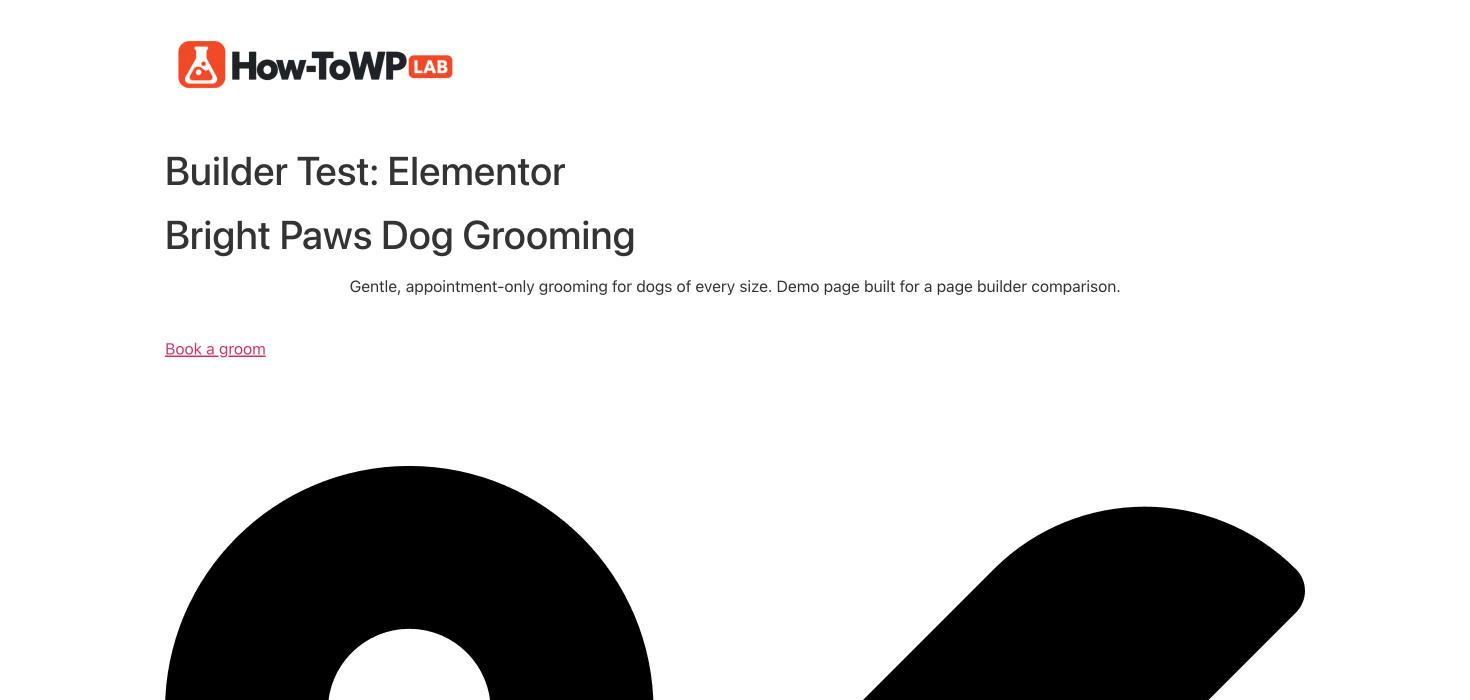
Elementor: when you save a page, Elementor also stores a plain HTML copy of it in the normal WordPress content. With Elementor and Elementor Pro deactivated, every heading, paragraph and link was still there. The design was gone and the icons showed up huge, but the content was safe and easy to clean up.
Divi 5: Divi stores pages as its own blocks, which only Divi can display. When I switched to a different theme, the page showed its title and nothing else. The content was still in the database, but visitors saw a blank page. Divi 4 left messy shortcodes behind instead; Divi 5’s blocks fail silently.

So if there’s a real chance you’ll change builders in a few years, Elementor is the safer choice. If you’re happy to commit, especially with Divi Lifetime where there’s no renewal to stop paying, this matters much less. Either way, keep a backup before switching. My guide on what to do before changing your WordPress theme covers the checklist.
Theme, Plugin or Both?
Divi is a theme, so it controls your whole site design, including the header, footer and blog layouts, through its Theme Builder. Elementor is a plugin, so you pair it with a theme. Most people use Hello Elementor, a free, nearly empty theme made for it, and build the header and footer with Elementor Pro’s Theme Builder.
In practice, both give you full control over every part of the site. Elementor’s plugin approach is what makes it easier to leave, as shown above.
Which Should You Choose?
- Choose Divi if you build or plan to build several sites, want to pay once with Lifetime, or like having one theme that handles everything. For freelancers and agencies, unlimited sites on every plan is hard to beat. See Divi’s current plans.
- Choose Elementor if you want to start free, only need one or two sites, or want to keep the option of switching builders later without losing your content.
Still comparing other options? My guide to choosing the best WordPress page builder covers more builders, including the free block editor.
Divi vs Elementor FAQ
Is Divi better than Elementor?
Neither is better for everyone. In my test, they built the same page with nearly the same speed. Divi is better value for many sites and for people who want to pay once. Elementor is better for a free start and for keeping your content if you stop using it.
Can I use Elementor with the Divi theme?
Technically yes, because Elementor is a plugin, but you’d be loading two page builders on one site. That adds weight and confusion, so pick one.
Does Divi have a free version?
No. Divi is paid only, starting at $89 a year, with a 30-day money-back guarantee. Elementor has a free plugin on WordPress.org.
What happens to my site if my Divi or Elementor license expires?
Your site keeps working with both. An expired license stops updates, support and access to cloud features such as templates and AI. You should still renew or move away eventually, because running a builder without updates is a security risk.
Subscribe to our Monthly Newsletter
Get monthly updates of WordPress tips, tricks, and tutorials in your email.
Thanks. You have successfully subscribed.


