Artificial intelligence is transforming how WordPress websites create and manage visual content. From generating featured imagesA featured image, also known as a post thumbnail, is an image that represents the contents of a WordPress post… More for blog postsA post is a type of content in WordPress, a popular open-source content management system used for creating an… More to producing product visuals for eCommerce stores, AI image generation in WordPress is quickly becoming a must-have capability for modern site owners.
In this tutorial, you’ll learn how AI image generation works in WordPress, the best AI image generator plugins, and step-by-step workflows you can use today to create, optimize, and automate AI-generated images—without needing design skills or expensive stock photos.
Getting Started with AI Image Generation in WordPress
AI image generation uses machine learning models to create images from text prompts. Instead of manually designing graphics or searching through stock photo libraries, WordPress users can now generate custom images directly inside their dashboardIn WordPress, the Dashboard is a central hub for managing a website’s content and settings. It is the first sc… More.
For content creators, publishers, and businesses, this means faster content production, unique visuals, and better brand consistency. Whether you run a blog, a WooCommerce store, or a content-heavy website, AI image generation for WordPress helps you scale visual content efficiently.
In this guide, we’ll explore how AI image tools integrate with WordPress, review the top plugins available, and walk through practical workflows you can implement right away.
How AI Image Generation Works in WordPress
At the core of AI image generation are text-to-image models like Stable Diffusion, DALL·E, and other generative AI systems. These models analyze text prompts and generate images that match the described concept, style, and composition.
For example, a prompt like “modern workspace with a laptop, minimal design, soft lighting” can produce a high-quality image suitable for a blog header or landing pageIn WordPress, a page is a content type that is used to create non-dynamic pages on a website. Pages are typica… More.
Most WordPress AI image plugins connect to these models through APIs, allowing image generation without running heavy computations on your hosting server.
Integration Methods for WordPress
There are three main ways AI image generation integrates into WordPress:
- Plugin-based API integration – The most common method, where plugins connect to external AI services.
- Cloud-based dashboards – Images are generated off-site and imported into WordPress.
- Self-hosted solutions – Advanced setups using servers or GPUs (less common for typical users).
For most site owners, AI image generator plugins for WordPress offer the best balance of performance and ease of use.
Benefits of Using AI Image Generation on WordPress Sites
Using AI-generated images in WordPress offers several advantages:
- Faster content creation – Generate visuals instantly while writing posts.
- Lower costs – Reduce or eliminate stock photo subscriptions.
- Unique images – Avoid overused stock photos seen across the web.
- Scalability – Produce visuals for large content libraries effortlessly.
- Better engagement – Custom visuals can improve click-through rates and user experience.
For SEO-focused websites, AI-generated images also provide opportunities to optimize alt text and filenames consistently.
Best AI Image Generation Plugins for WordPress
Stable Diffusion WordPress Plugins
Stable Diffusion-based plugins are popular because they offer flexibility, style customization, and strong image quality.
Key features:
- Prompt-based image generation
- Multiple styles and resolutions
- GutenbergGutenberg is the name of a modern WordPress editor that was introduced with the release of WordPress 5.0 in De… More editor integration
Best for: Bloggers, designers, and publishers who want creative control.
Pros:
- Highly customizable
- Cost-effective at scale
Cons:
- Prompt learning curve for best results
DALL·E & OpenAI-Powered WordPress Plugins
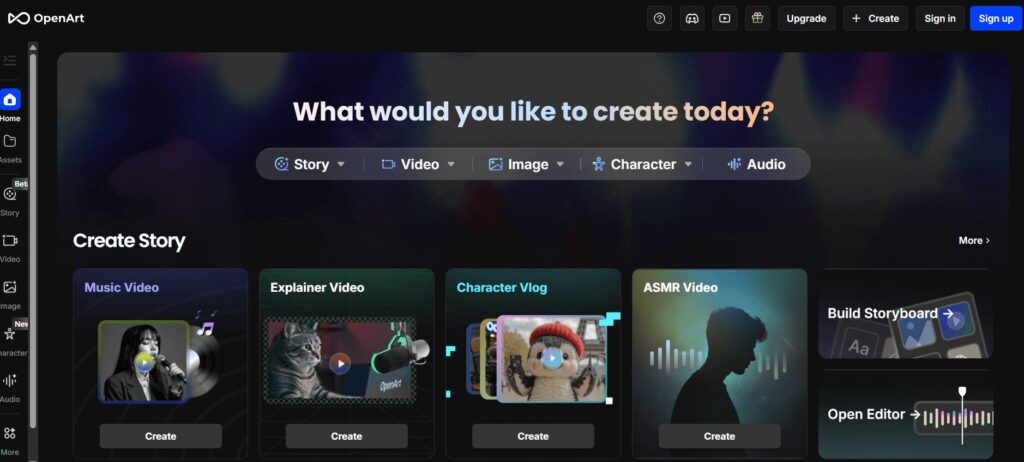
DALL·E-powered plugins focus on ease of use and consistency. These plugins integrate directly into the WordPress editor, allowing users to generate images while writing content.
Key features:
- Simple text prompts
- High-quality, realistic images
- Seamless editor workflow
Best for: Beginners and non-designers.
Pros:
- Minimal setup
- Consistent output quality
Cons:
- Usage-based pricing
- Less fine-grained style control
All-in-One AI Plugins with Image Generation

Some WordPress (AIOSEO) AI tools combine content writing, image generation, and automation into a single pluginA plugin is a software component that adds specific features and functionality to your WordPress website. Esse… More.
Key features:
- AI writing + AI images
- Bulk content workflows
- Automation rules
Best for: Content teams, agencies, and niche sites publishing at scale.
Pros:
- End-to-end AI workflow
- Time-saving automation
Cons:
- Higher cost
- May include features you don’t need
Comparison Summary
When choosing an AI image generator for WordPress, consider:
- Pricing model (per image vs subscription)
- Editor compatibility (Gutenberg, Classic, page builders)
- Image resolution and licensing
- Automation capabilities
Step-by-Step Tutorial: Generate AI Images in WordPress
Step 1: Install an AI Image Generator Plugin
From your WordPress dashboardIn WordPress, the Dashboard is a central hub for managing a website’s content and settings. It is the first sc… More:
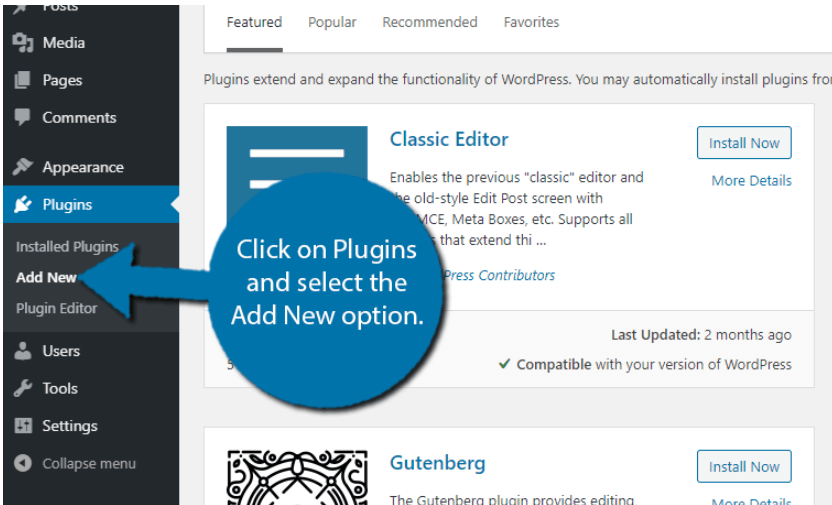
- Go to Plugins → Add New
- Search for an AI image generator plugin
- Install and activate the plugin
- Connect your API key if required
Choose a plugin that integrates directly with the WordPress block editor for the smoothest experience.
Step 2: Create AI Images from the WordPress Editor
Open a new or existing postA post is a type of content in WordPress, a popular open-source content management system used for creating an… More and look for the AI image block or toolbar option.

Best practices for prompts:
- Be specific (subject, style, mood)
- Mention colors, lighting, or composition
- Avoid vague descriptions
Example prompt: “Minimalist illustration of artificial intelligence in WordPress dashboard style, blue and white color palette”
Step 3: Save & Manage AI Images in the Media LibraryThe Media Library in WordPress is a feature that allows users to easily upload and manage media files such as … More
Once generated, images are stored in the WordPress Media Library.
Optimization tips:
- Rename files with descriptive keywords
- Add SEO-friendly alt text
- Compress images for faster loading
- Use consistent naming conventions
This ensures your AI images in WordPress are search engine-friendly and accessible.
Advanced AI Image Workflows for WordPress
Automated Featured ImageA featured image, also known as a post thumbnail, is an image that represents the contents of a WordPress post… More Generation
Many AI plugins allow automatic image creation based on:
- Post titles
- CategoriesIn WordPress, categories are a fundamental taxonomy used to group and organize posts based on their topics or … More or tagsIn WordPress, tags are a taxonomy used to classify and organize posts. They are similar to categories, but unl… More
- Content summaries
This is ideal for high-volume publishing workflows.
AI Images for WooCommerce Products
AI image generation can help create:
- Product mockups
- Concept visuals
- Placeholder images for new listings
While AI images shouldn’t replace real product photos entirely, they work well for previews, categories, and marketing materials.
AI Image + Content Pipelines
Advanced workflows combine:
- AI writing tools
- AI image generation
- Scheduled publishing
This approach is especially useful for niche sites and editorial teams aiming to scale content efficiently.
SEO Best Practices for AI-Generated Images in WordPress
To maximize SEO impact:
- Use descriptive filenames (e.g., ai-image-generation-wordpress.jpg)
- Write meaningful alt text aligned with page content
- Compress images to improve Core Web Vitals
- Avoid duplicate visuals across multiple posts
- Ensure accessibility compliance
Well-optimized AI images can enhance image search visibility and overall page performance.
Common Challenges & Limitations
Despite its benefits, AI image generation has limitations:
- Prompt quality affects output
- Brand consistency may require manual refinement
- Some images may feel generic
- Ethical and copyright considerations still apply
- Excessive image generation may impact site performance
Understanding these challenges helps you use AI responsibly and effectively.
Future of AI Image Generation in WordPress
AI image tools are rapidly evolving. Future developments may include:
- Native WordPress AI features
- Real-time image personalization
- Deeper block editor integration
- Smarter automation and styling controls
WordPress users who adopt AI early will be well-positioned to benefit from these advancements.
FAQ – AI Image Generation for WordPress
1. What is AI image generation in WordPress?
AI image generation in WordPress refers to using artificial intelligence tools or plugins to create images directly from text prompts within the WordPress dashboard. These tools connect to AI models such as Stable Diffusion or DALL·E and allow users to generate custom visuals for blog posts, pagesIn WordPress, a page is a content type that is used to create non-dynamic pages on a website. Pages are typica… More, and products without graphic design skills.
2. Which is the best AI image generator plugin for WordPress?
The best AI image generator for WordPress depends on your needs. Stable Diffusion-based plugins offer more creative control, while OpenAI-powered plugins like DALL·E focus on simplicity and image quality. All-in-one AI plugins are ideal for publishers who want combined content writing and image generation workflows.
3. Are AI-generated images safe to use on WordPress websites?
In most cases, yes. Many AI image generation tools provide commercial usage rights for generated images. However, you should always review the plugin’s licensing terms and avoid prompts that replicate copyrighted characters or brands. Using AI images responsibly ensures legal and ethical compliance.
4. Do AI-generated images affect WordPress SEO?
AI-generated images can positively impact SEO when optimized correctly. Adding descriptive filenames, relevant alt text, and compressing images for performance helps improve visibility in image search results. Poorly optimized AI images, however, may slow down page speed or reduce accessibility.
5. Can AI image generation replace stock photos in WordPress?
AI image generation can reduce reliance on stock photos, especially for blog headers, illustrations, and concept visuals. While AI images may not fully replace real photography for products or people, they are excellent for unique visuals and creative content.
6. Can I automatically generate featured images using AI in WordPress?
Yes. Many WordPress AI image plugins support automated featured image generation based on post titles, categories, or content summaries. This feature is especially useful for high-volume publishing websites and content automation workflows.
7. Is AI image generation suitable for WooCommerce stores?
AI image generation works well for WooCommerce categoryIn WordPress, categories are a fundamental taxonomy used to group and organize posts based on their topics or … More images, promotional banners, and product concepts. However, for physical products, real product photos are still recommended to maintain trust and accuracy.
8. Are AI image generation plugins expensive?
Pricing varies by plugin and AI provider. Some plugins offer free image credits, while others charge per image or use monthly subscriptions. Costs depend on image resolution, usage volume, and automation features.
9. Can AI images be edited after generation in WordPress?
Yes. Once generated, AI images are stored in the WordPress Media Library and can be edited using built-in WordPress tools or third-party image editors. You can crop, resize, compress, or enhance images as needed.
10. Will WordPress add built-in AI image generation in the future?
While there is no official confirmation yet, AI integration is a growing focus in the WordPress ecosystem. Future WordPress versions will likely include deeper AI features or native AI image generation capabilities.
Conclusion & Next Steps
AI image generation for WordPress is no longer experimental—it’s a practical tool for content creation, branding, and automation. With the right plugins and workflows, you can generate high-quality visuals directly inside WordPress while improving efficiency and SEO.
Start by testing one AI image plugin, refine your prompts, and gradually build automated workflows that match your content strategy. As AI tools continue to mature, integrating them into your WordPress site will become an essential competitive advantage.
Ready to Power AI Image Generation in WordPress?
AI image generation in WordPress works best on a fast, secure, and well-maintained site. If you’re looking for high-performance WordPress hosting combined with done-for-you updates and expert management, Gigapress has you covered.
👉 Check out our hosting packages by clicking the button below and give your WordPress site the speed, stability, and support it needs to scale AI-powered workflows with confidence.