Voice search is no longer a future concept—it’s already influencing how people discover websites online. From asking Siri for nearby services to using Google Assistant to surface quick answers, search behavior is becoming more conversational. This shift has pushed many site owners to rethink their SEO approach, making voice optimized WordPress sites a clear differentiator in competitive search results.
Rather than focusing on theory or step-by-step instructions, this case study looks at how real WordPress sites are adapting to voice-first search. These examples show what happens when performance, content structure, and search intent align—especially on fast, reliable WordPress setups built to handle modern search demands.
In the sections ahead, we’ll examine real-world examples of voice optimized WordPress sites, highlight the strategies they used, and share the measurable outcomes they achieved. The goal is simple: show what’s working right now, why it works, and how voice optimization is driving visibility and engagement for WordPress sites in the real world.
Why Voice-Optimized WordPress Sites Matter Today
Voice search usage has grown rapidly due to smartphones, smart speakers, and AI-powered assistants. According to industry trends, voice searches are typically longer, more conversational, and more intent-driven than traditional text searches. Instead of typing “WordPress SEO tips,” users now ask, “How do I optimize my WordPress site for voice search?”

This behavior change is exactly why voice optimized WordPress sites are gaining an edge in search visibility and engagement.
For beginners, the good news is this: you don’t need advanced coding skills to get started. With the right structure, content approach, and tools, WordPress makes voice search optimization surprisingly accessible.
In the sections below, we’ll look at what makes a WordPress site voice-friendly—and then dive into real-world case studies that show these principles in action.
What Makes a WordPress Site Voice-Optimized?
Before reviewing examples, let’s clarify what voice search optimization for WordPress actually means.
A voice optimized WordPress site is designed to answer spoken questions clearly, quickly, and accurately. Search engines prioritize content that sounds natural when read aloud and delivers concise answers.
Core Elements of Voice Search Optimization for WordPress
Here’s a beginner-friendly checklist:
- Conversational keywords Use long-tail, question-based phrases like:
- “What is voice search optimization for WordPress?”
- “How do voice assistants find websites?”
- Clear, direct answers Short paragraphs, bullet points, and definitions help search engines extract answers for voice results.
- Featured snippet optimization Voice assistants often read featured snippets aloud. Structuring content to win these snippets is critical.
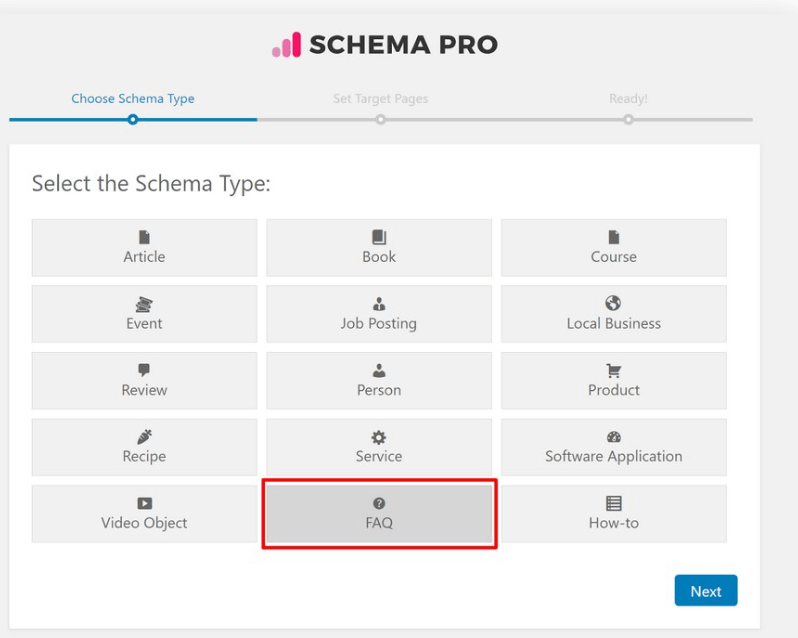
- Schema markup FAQ, How-To, and Local Business schema help search engines understand your content context.
- Mobile speed and usability: Most voice searches happen on mobile devices, so fast-loading WordPress sites perform better.

With this foundation in mind, let’s explore how real businesses and publishers are putting these ideas into practice.
Case Study #1: Local Business WordPress Site Optimized for “Near Me” Voice Searches
Industry: Local Service Business
Platform: WordPress
Primary Goal: Appear in voice searches like “best plumber near me”
Local businesses are some of the biggest winners in voice search. In this case, a service-based WordPress site focused on answering location-specific voice queries.
The Challenge
The business had a functional website but struggled to appear for voice-based searches such as:
- “Who offers emergency plumbing services near me?”
- “Is there a plumber open right now?”
Optimization Strategy
The site implemented several voice search–friendly changes:
- Added a FAQ section answering spoken-style questions
- Used local conversational keywords instead of short phrases
- Implemented Local Business schema markup
- Optimized pageIn WordPress, a page is a content type that is used to create non-dynamic pages on a website. Pages are typica… More titles and headings for natural language
Results
- Increased visibility in local voice search results
- Higher engagement from mobile users
- More phone calls directly from search results
Key Takeaway
For beginners, this example shows that voice optimized WordPress sites for local businesses succeed by focusing on how people speak, not just what they type.
Case Study #2: Content Publisher Using Conversational SEO on WordPress
Industry: Online Publishing / Blogging
Platform: WordPress

Primary Goal: Win featured snippets for voice search queries
Content-heavy WordPress sites are ideal candidates for voice optimization—if the content is structured correctly.
The Challenge
The publisher had high-quality articles but low visibility for voice-based informational queries like:
- “What is voice search SEO?”
- “How does voice search work on WordPress?”
Optimization Strategy
They restructured content using conversational SEO techniques:
- Headings rewritten as spoken questions
- Short, direct answers placed immediately under headings
- Use of “People Also Ask”–style formatting
- Improved internal linking for topic clarity
Results
- Multiple featured snippet placements
- Increased average time on page
- Higher engagement from voice-driven users
Key Takeaway
Voice optimized WordPress sites don’t require new content—just smarter formatting that aligns with conversational search behavior.
Case Study #3: E-Commerce WordPress Site Leveraging Voice Search Optimization
Industry: E-Commerce
Platform: WordPress + WooCommerce
Primary Goal: Capture high-intent voice search traffic
Voice search isn’t just for information—it’s increasingly used for shopping-related queries.
The Challenge
The WooCommerce store wasn’t appearing for queries like:
- “What is the best wireless keyboard for gaming?”
- “Which laptop accessories are good for students?”
Optimization Strategy
The site focused on voice-friendly product content:
- Added product Q&A sections
- Optimized descriptions using natural, spoken language
- Implemented Product and FAQ schema
- Improved mobile performance and page speed
Results
- Increased organic traffic from long-tail queries
- Better mobile conversion rates
- Improved discoverability through voice assistants
Key Takeaway
Voice optimized WordPress sites in e-commerce succeed by answering buyer questions before the user even reaches the product page.
You don’t need advanced development skills to optimize for voice search. These beginner-friendly tools make it manageable:
Essential Tools for Voice Search Optimization
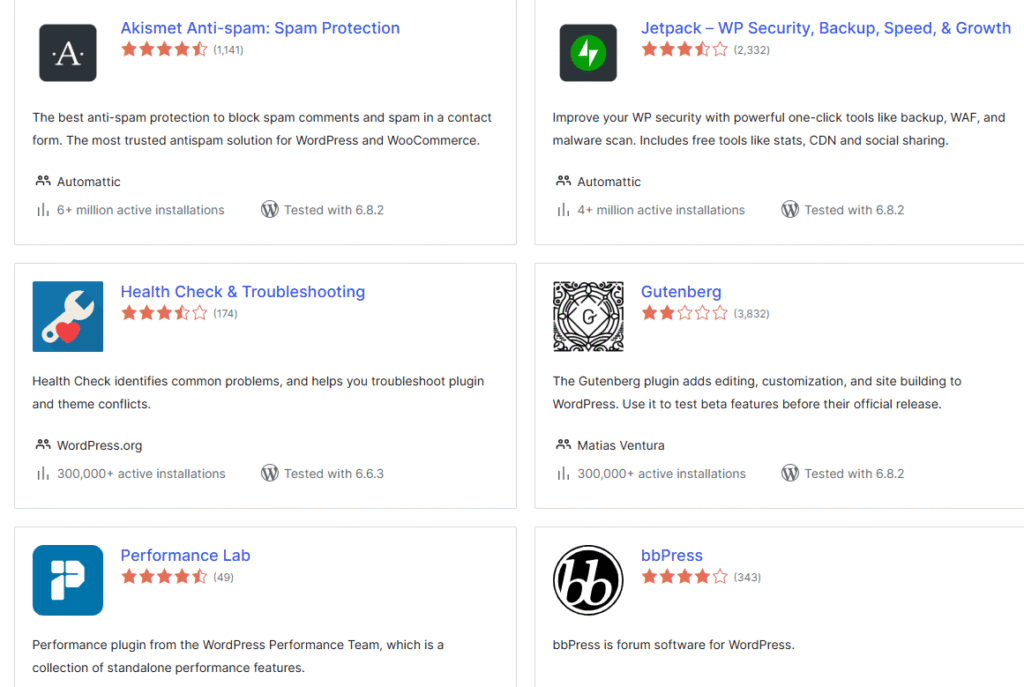
- SEO plugins that support schema and conversational keywords
- Schema markup plugins for FAQ and How-To content
- Performance optimization tools for faster loading times
- Mobile optimization themesA WordPress theme is a set of files that determine the design and layout of a website. It controls everything … More: designed for responsive design
When combined with a performance-focused hosting platform like Gigapress, these tools help WordPress sites meet the technical requirements voice assistants prefer.
Common Mistakes to Avoid When Optimizing WordPress for Voice Search
Even well-intentioned beginners make mistakes. Here are a few to watch out for:
- Writing for search engines instead of people: Voice search favors natural language, not keyword stuffing.
- Ignoring mobile performance: Slow sites rarely win voice results.
- Skipping structured data: Without schema, search engines may not understand your content well enough.
- Targeting only short keywords: Voice searches are usually long-tail and question-based.
Avoiding these issues can significantly improve your voice search readiness.
How to Turn Your WordPress Site into a Voice-Optimized Success Story
If you’re just starting, follow this simple roadmap:
- Audit existing content for conversational opportunities
- Add FAQ sections to key pagesIn WordPress, a page is a content type that is used to create non-dynamic pages on a website. Pages are typica… More
- Optimize headings using spoken questions
- Implement schema markup
- Improve site speed and mobile usability
These steps form the foundation of most voice-optimized WordPress sites we see performing well today.
Frequently Asked Questions (FAQ)
What are voice optimized WordPress sites?
Voice optimized WordPress sites are websites designed to answer spoken search queries clearly and naturally. They use conversational language, fast loading speeds, mobile-friendly design, and structured data so voice assistants like Google Assistant can easily read and deliver their content.
How do voice optimized WordPress sites improve SEO?
Voice optimized WordPress sites improve SEO by targeting long-tail, conversational keywords and question-based searches. This increases the chances of appearing in featured snippets, local voice results, and mobile searches, leading to higher visibility and engagement.
Do beginners need technical skills to create voice optimized WordPress sites?
No. Beginners can build voice optimized WordPress sites using SEO plugins, schema tools such RankMath, and proper content formatting. Most voice optimization techniques focus on how content is written and structured rather than advanced coding.
What type of content works best for voice search on WordPress?
Content that works best includes FAQs, how-to guides, definitions, and clear answers to common questions. Voice optimized WordPress sites often use short paragraphs, bullet points, and headings written as natural questions.
Is site speed important for voice optimized WordPress sites?
Yes. Site speed is critical because voice searches are mostly performed on mobile devices. Fast-loading voice optimized WordPress sites are more likely to rank higher and be selected by voice assistants.
Can eCommerce WordPress sites benefit from voice search optimization?
Absolutely. Voice optimized WordPress sites in eCommerce can capture high-intent searches by answering product-related questions, using conversational descriptions, and adding structured product and FAQ schema.
What tools help create voice optimized WordPress sites?
Common tools include WordPress SEO plugins, schema markup plugins, performance optimization tools, and mobile-friendly themes. Reliable WordPress hosting also plays a major role in speed and stability.
How long does it take to see results from voice search optimization?
Results vary, but many voice optimized WordPress sites begin seeing improvements in featured snippets, mobile traffic, and engagement within a few weeks after proper optimization.
Conclusion: The Future of Voice Search and WordPress SEO
Voice search is reshaping SEO faster than many site owners realize. The real-world examples in this guide show that success doesn’t come from complex tricks—it comes from clarity, structure, and user-focused content.
For beginners, WordPress remains one of the most accessible platforms to implement voice search optimization. By learning from proven case studies and applying conversational SEO techniques, your site can stay competitive in a voice-first search landscape.
The takeaway is simple: optimize for how people speak, not just how they type. The WordPress sites doing this today are already winning tomorrow’s traffic.
If you’re building voice-optimized WordPress sites and need fast WordPress hosting with done-for-you updates, check out our hosting packages by clicking the button below.


![How to Customize WordPress Admin Dashboard [A Visual Guide]](https://codingheros.com/wp-content/webp-express/webp-images/uploads/2024/06/how-to-customize-wordpress-admin-dashboard-a-visual-guide.png.webp)
