Schema for voice search might sound like fancy tech jargon, but you’ve already used it without even realizing it. Think about the last time you called across the room, “Hey Google, how do I reset my router?” and your smart speaker confidently read back the answer. Pretty magical, right?
What most site owners don’t know is that Google usually pulls those spoken answers from websites using structured data—specifically schema markup. In other words, the sites that take a few extra minutes to add schema are the ones Google loves to talk about (literally).
And if your WordPress site doesn’t have schema set up correctly, you’re quietly missing out on millions of voice-driven search opportunities happening every day.
The good news? Schema markup isn’t as complicated as it sounds. With the right tools and a little guidance, you can make your WordPress site “speak fluent Google”—even if you’re not a technical SEO expert.
In this guide, we’ll break down what schema is, why it matters for voice search, and how to implement it step-by-step without breaking anything on your site.
Let’s get your content ready for the era of voice assistants.
Why Your WordPress Site Needs to “Speak” for Voice Search
Voice search isn’t the future—it’s now. Consumers are asking Google Assistant, Siri, Alexa, and Bixby millions of questions every day. And unlike text-based search, voice results often pull from one single answer, not a list of links.
This is where schema markup comes in.
Schema helps Google understand exactly what your pageIn WordPress, a page is a content type that is used to create non-dynamic pages on a website. Pages are typica… More is about—what your questions are, what your answers mean, which steps belong in a tutorial, and which details describe your business.
The more Google understands your content, the more likely your WordPress site appear as a spoken answer.
You’re not just optimizing for search results anymore—you’re optimizing to be the voice Google chooses.
What Is Schema Markup? (And Why Voice Search Depends on It)
Think of schema markup as a “translator” between your website’s content and Google’s brain.

Without a schema, Google sees your content like an unstructured block of text. With schema, Google receives a neatly labeled dataset explaining:
- “This section is an FAQ.”
- “This line is the step in a how-to guide.”
- “This info is the official phone number of a local business.”
Schema markup is a form of structured data, typically written in JSON-LD format (which Google recommends). It doesn’t change what visitors see—it only adds clarity behind the scenes.
For voice search specifically, schema markup acts as a signal flare telling Google:
“My content directly answers this question—read it aloud!”
If you want your content to become a voice assistant’s answer, schema is the shortcut.
How Voice Search Works: Matching Questions to Answers
When a user speaks into a device, Google breaks down the query into intent-based language. Instead of focusing on keywords like a traditional typed search, voice search focuses on:
- Conversational language (“How do I…, What should I…, Where is the nearest…”)
- Question-based phrasing
- Clear, direct answers
- Structured data that confirms meaning
Here’s the secret most WordPress site owners don’t realize:
Voice search answers often come from featured snippets—and featured snippets often come from pagesIn WordPress, a page is a content type that is used to create non-dynamic pages on a website. Pages are typica… More using structured data.
Schema helps Google confidently extract:
- Answers
- Steps
- Definitions
- Business details
- Product data
If your content is structured clearly, Google has zero guesswork. That means your chances of becoming the spoken answer skyrocket.
The Best Schema Types for Voice Search
Not all schema types help equally with voice answers. Below are the top categoriesIn WordPress, categories are a fundamental taxonomy used to group and organize posts based on their topics or … More you should focus on:
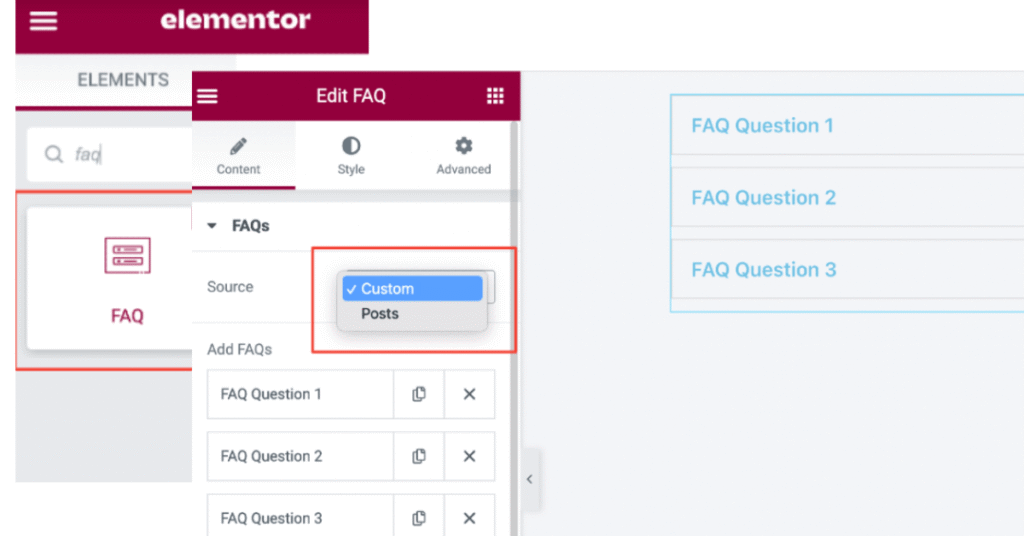
1. FAQ Schema
Voice search loves FAQ schema. Why? Because people speak in questions.
If your page lists Q&A sections—especially conversational ones—FAQ schema can make them prime candidates for spoken answers.
2. How-To Schema
This schema tells Google that your content contains a step-by-step tutorial. Voice assistants often read instructions step-by-step, making this one of the most powerful formats for voice optimization.
3. Article / BlogPosting Schema
This helps Google understand that your content is an editorial article, improving context and categorization. It can support your chances of becoming a featured snippet.
4. Local Business Schema
Voice searches like “pizza near me” or “best dentist near me” depend heavily on LocalBusiness schema. It clarifies:
- NAP info (name, address, phone)
- Opening hours
- Geo coordinates
- Type of business
If you do local SEO, this schema is essential.
5. Organization / Person Schema
These types help voice assistants correctly identify your brand or author. They improve credibility and clarity.
6. Product Schema
Ideal for eCommerce sites. Google uses this to present product details in spoken results.
7. Speakable Schema
This one is designed specifically for voice assistants. It highlights which parts of your content are suitable for text-to-speech output.
Currently, speakable schema has limited support—but it’s still a future-proof addition.
How to Add Schema Markup in WordPress (Beginner-Friendly Methods)
You don’t need coding knowledge to add schema for voice search. Here are the easiest methods:
Method 1: Use an SEO PluginA plugin is a software component that adds specific features and functionality to your WordPress website. Esse… More (Simplest Option)
Plugins like:
- Yoast SEO
- Rank Math

- All in One SEO (AIOSEO)
automatically generate core schema such as:
- Article schema
- BlogPosting schema
- Organization schema
- Breadcrumbs schema
Rank Math and AIOSEO offer more control and richer schema options for beginners.
Method 2: Use a Dedicated Schema Plugin
Tools like:
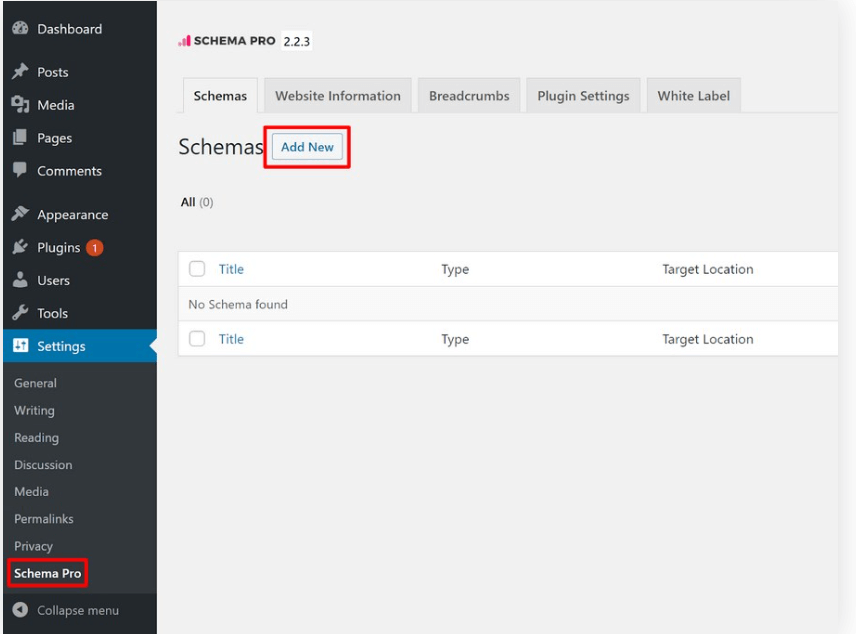
- Schema Pro
- WP Schema
- Structured Content (Schema) Block
These plugins give you easy block-based controls for adding FAQ, How-To, and other schema types directly in WordPress.
If you want voice-search-optimized schema without coding, dedicated schema plugins are perfect.
Method 3: Add Schema Manually (For the Curious Beginner)
If you’re comfortable editing your themeA WordPress theme is a set of files that determine the design and layout of a website. It controls everything … More or a code snippet plugin, you can paste JSON-LD schema directly into:
- Header.php,
- Footer.php, or
- A custom code snippet plugin.
Be careful—the manual schema must be exact, or it may cause errors.
Step-by-Step: Adding FAQ Schema for Voice Search
FAQ schema is one of the easiest ways to optimize for voice search. Here’s how to do it:
Step 1: Choose Question-Based Keywords
Think conversationally:
- “How do I…”
- “What’s the best way to…”
- “Can I fix…”
These long-tail keywords align perfectly with voice queries.
Step 2: Add FAQs to Your WordPress Content
Write FAQs in natural, concise language. Avoid fluff—voice assistants prefer direct, crisp answers.
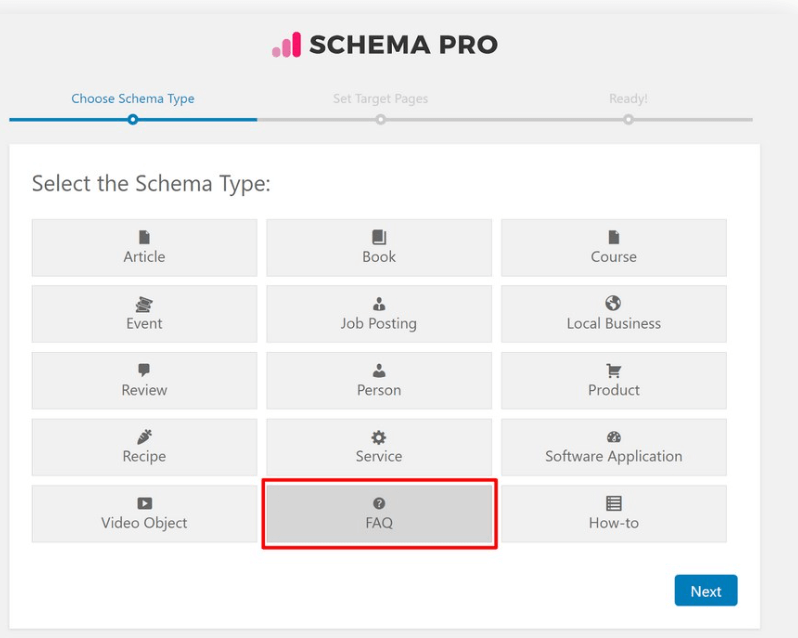
Step 3: Use a Schema Block
If you’re using Rank Math or AIOSEO, simply insert an FAQ block in the editor.
The plugin will automatically attach a valid FAQ schema.
Step 4: Validate Your Schema
Test using:
- Google Rich Results Test
- Schema.org Validator
- Search Console Enhancements
This ensures Google can read your FAQ schema correctly.
Why This Works
When someone asks a question similar to yours, Google may pull your Q&A and read it aloud—making your site the “voice answer.”
Step-by-Step: Adding How-To Schema for Voice Search
If your content is instructional, this schema is a must-have.
Step 1: Outline Steps Clearly
Break the process into:
- Clear steps
- Short instructions
- Optional images
Google loves clean structure.
Step 2: Insert a How-To Block
Using Rank Math, AIOSEO, or Schema Pro, place a “How-To” block in the editor.
Fill out key fields:
- Estimated time
- Tools needed
- Supplies
- Step titles
- Step descriptions
Step 3: Validate the Schema
Use the same testing tools as before.
Why It Works
Smart speakers read How-To schema in step order, making your tutorial the go-to guide for voice users.
Extra Optimizations to Make Your Content Voice-Search Friendly
Schema alone won’t make your content voice-ready—you also need to optimize the content itself.
Here’s how:
1. Write in Natural, Conversational Language
Voice queries sound like real conversations. Your content should too.
2. Use Long-Tail, Question-Based Keywords
Examples:
- “best schema for voice search”
- “How to add faq schema in WordPress without coding.”
- “voice search optimization for beginners”
These align perfectly with voice-style queries.
3. Keep Answers Short and Scannable
Aim for:
- 40–60 word answers
- Bulleted steps
- Clear definitions
Shorter answers improve your chance of becoming a featured snippet—and therefore the spoken result.
4. Improve Mobile Speed & Performance
Voice searches often happen on mobile. A slow site equals lost opportunities.
5. Make Your Site Secure (HTTPS)
Google prefers secure sites for rich results and voice responses.
Testing, Validating & Monitoring Schema Markup
Even if you use plugins, schema can break. Always test new implementations using:
Google’s Rich Results Test
Checks if your schema qualifies for rich results.
Schema.org Validator
Validates JSON-LD and flags issues.
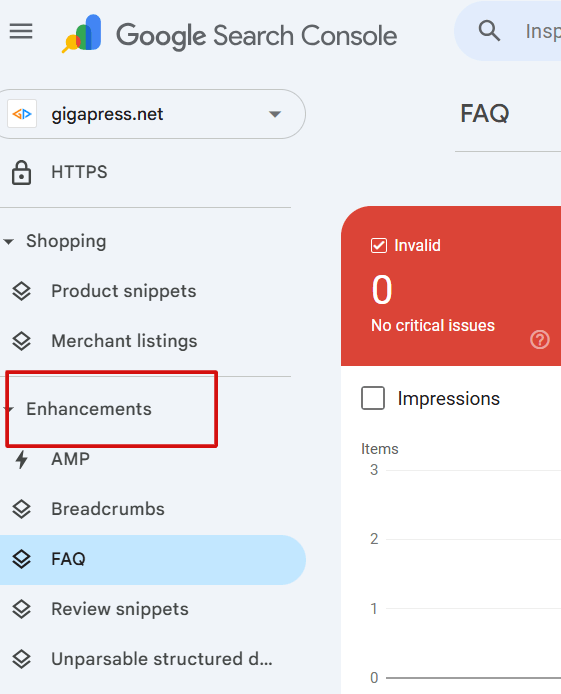
Google Search Console
Under “Enhancements,” you’ll see:
- FAQ
- How-To
- Products
- Articles
Any errors shown here must be fixed immediately.
Common Schema Mistakes Beginners Should Avoid
1. Adding a Schema That Doesn’t Match Your Content
Google hates mismatched schema—it can lead to manual penalties.
2. Copying the Same FAQ Schema to Multiple Pages
Duplicate FAQs across your site reduce your authority.
3. Forgetting Required Fields
An incomplete schema won’t validate.
4. Using Too Many Plugins That Add Conflicting Schema
Stick to one SEO plugin and one dedicated schema plugin if needed.
5. Not Testing Schema After Publishing
Even small theme changes can break structured data.
Setting Realistic Expectations About Schema
Schema markup is powerful, but it’s not magic. It won’t guarantee ranking #1. It won’t automatically put your content in Google’s voice answers.
What it will do is:
- Help Google understand your content with near-perfect clarity
- Increase your odds of earning featured snippets
- Increase your visibility in voice search results
- Improve your chances of being “the answer” Google speaks aloud
When you combine schema markup with high-quality content, conversational phrasing, and a fast WordPress site, the results can be transformational.
Conclusion: Start Making Your WordPress Site “Voice-Ready” Today
You don’t need to be a developer to use schema for voice search. You just need the right tools and a basic understanding of how structured data works.
By implementing FAQ schema, How-To schema, Article schema, and other structured data types, you give Google exactly what it needs to choose your content as the spoken answer.
If future-proofing your WordPress site matters to you—and it should—schema markup is no longer optional. It’s a fundamental part of modern SEO and an essential tool for winning in a voice-first search world.
Your site is ready. Your audience is searching. Now it’s time to help Google hear you clearly.
If you’re excited to optimize your WordPress site with schema for voice search—and want blazing-fast hosting plus fully managed updates—our hosting packages are just a click away. Tap the button below.


![How to Remove Just Another WordPress Site [A Visual Guide]](https://codingheros.com/wp-content/webp-express/webp-images/uploads/2024/06/how-to-remove-just-another-wordpress-site-a-visual-guide.png.webp)